关于chatGPT是什么,有什么用,这里就不多说了,我相信当你开始关注API时对它已经有了基本的了解,同样,对账号注册等这里也不做介绍。
OPENAI_API_KEY='sk-KK***dd'API
chatGPT网页版封了中国IP,但是通过API还是可以正常调用服务的,可官网API文档大陆也没法正常访问,这里介绍基本的API。
重点提示:API版模型和网页版没法比,开放的模型版本低于网页版,蠢死了,仅供技术学习和体验,无法实现网页版那么智能的功能。
需要注意的是API是有限额的,具体如下:
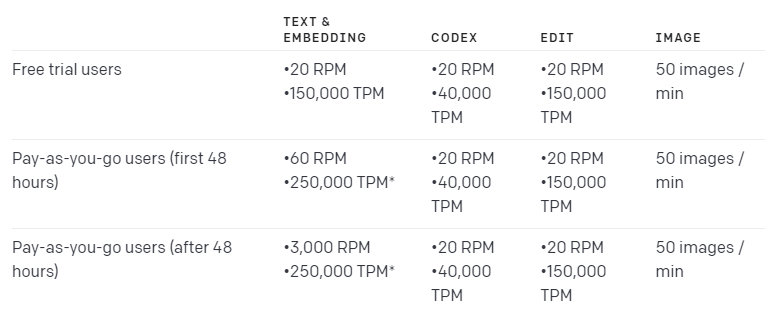
额度限制是在组织上,不是在用户账号上,用户可以在发起请求时指定使用哪个组织的额度。
对API官方提供的有Python和Nodejs的包,安装方式如下:
pip install openai
npm install openai
本文重点介绍的是标准的HTTP请求接口及CURL和Python版示例
# !pip install openaiimport openai
openai.api_key = OPENAI_API_KEY认证
所有API请求都应在 Authorization HTTP标头中包含API密钥,如下所示:
Authorization: Bearer YOUR_API_KEY密钥可从以下网址中申请:
组织
对于属于多个组织的用户,可以传递一个标头来指定用于API请求的组织。这些API请求的使用将计入指定组织的订阅配额。
示例
curl https://api.openai.com/v1/models \
  -H 'Authorization: Bearer YOUR_API_KEY' \
  -H 'OpenAI-Organization: org-731BUwkIVAz6b1eBzWDCOpnc'
注意:这里的
org-731BUwkIVAz6b1eBzWDCOpnc是我个人账号的组织ID
组织ID可从以下网址查看:
模型
OpenAI API由一系列具有不同功能和价位的模型提供支持。
模型介绍
模型主要包括以下三类:
| MODELS | DESCRIPTION |
|---|---|
| GPT-3 | A set of models that can understand and generate natural language |
CodexLimited beta |
A set of models that can understand and generate code, including translating natural language to code |
| Content filter | A fine-tuned model that can detect whether text may be sensitive or unsafe |
GPT-3
GPT-3模型可以理解并生成自然语言,包括4种主要的模型,Davinci最强,Ada最快。
| LATEST MODEL | DESCRIPTION | MAX REQUEST | TRAINING DATA |
|---|---|---|---|
| text-davinci-003 | Most capable GPT-3 model. Can do any task the other models can do, often with higher quality, longer output and better instruction-following. Also supports inserting completions within text. | 4,000 tokens | Up to Jun 2021 |
| text-curie-001 | Very capable, but faster and lower cost than Davinci. | 2,048 tokens | Up to Oct 2019 |
| text-babbage-001 | Capable of straightforward tasks, very fast, and lower cost. | 2,048 tokens | Up to Oct 2019 |
| text-ada-001 | Capable of very simple tasks, usually the fastest model in the GPT-3 series, and lowest cost. | 2,048 tokens | Up to Oct 2019 |
关于不同模型的功能差异可以从这里对比测试:https://gpttools.com/comparisontool
Codex
Codex模型是GPT-3模型的后代,可以理解和生成代码。Codex模型的训练数据包含自然语言和来自GitHub的数十亿行公共代码,最精通Python,还精通包括JavaScript、Go、Perl、PHP、Ruby、Swift、TypeScript、SQL和Shell等十几种语言。
| LATEST MODEL | DESCRIPTION | MAX REQUEST | TRAINING DATA |
|---|---|---|---|
| code-davinci-002 | Most capable Codex model. Particularly good at translating natural language to code. In addition to completing code, also supports inserting completions within code. | 8,000 tokens | Up to Jun 2021 |
| code-cushman-001 | Almost as capable as Davinci Codex, but slightly faster. This speed advantage may make it preferable for real-time applications. | Up to 2,048 tokens |
模型列表
GET https://api.openai.com/v1/models列出当前所有可用模型,并列出模型的基本信息。
示例
curl https://api.openai.com/v1/models \
  -H 'Authorization: Bearer YOUR_API_KEY'
结果
{
    "object": "list",
    "data": [
        {
            "id": "babbage",
            "object": "model",
            "created": 1649358449,
            "owned_by": "openai",
            "permission": [
                {
                    "id": "modelperm-49FUp5v084tBB49tC4z8LPH5",
                    "object": "model_permission",
                    "created": 1669085501,
                    "allow_create_engine": false,
                    "allow_sampling": true,
                    "allow_logprobs": true,
                    "allow_search_indices": false,
                    "allow_view": true,
                    "allow_fine_tuning": false,
                    "organization": "*",
                    "group": null,
                    "is_blocking": false
                }
            ],
            "root": "babbage",
            "parent": null
        },
        {
            "id": "ada",
            "object": "model",
            "created": 1649357491,
            "owned_by": "openai",
            "permission": [
                {
                    "id": "modelperm-xTOEYvDZGN7UDnQ65VpzRRHz",
                    "object": "model_permission",
                    "created": 1669087301,
                    "allow_create_engine": false,
                    "allow_sampling": true,
                    "allow_logprobs": true,
                    "allow_search_indices": false,
                    "allow_view": true,
                    "allow_fine_tuning": false,
                    "organization": "*",
                    "group": null,
                    "is_blocking": false
                }
            ],
            "root": "ada",
            "parent": null
        },
        {
            "id": "davinci",
            "object": "model",
            "created": 1649359874,
            "owned_by": "openai",
            "permission": [
                {
                    "id": "modelperm-U6ZwlyAd0LyMk4rcMdz33Yc3",
                    "object": "model_permission",
                    "created": 1669066355,
                    "allow_create_engine": false,
                    "allow_sampling": true,
                    "allow_logprobs": true,
                    "allow_search_indices": false,
                    "allow_view": true,
                    "allow_fine_tuning": false,
                    "organization": "*",
                    "group": null,
                    "is_blocking": false
                }
            ],
            "root": "davinci",
            "parent": null
        }
    ]
}
# openai.Model.list()检索模型
GET https://api.openai.com/v1/models/{model}检索指定模型的基本信息~
示例
curl https://api.openai.com/v1/models/{model} \
  -H 'Authorization: Bearer YOUR_API_KEY'
结果
{
    "id": "text-davinci-003",
    "object": "model",
    "created": 1669599635,
    "owned_by": "openai-internal",
    "permission": [
        {
            "id": "modelperm-ak6NZ2MXtGBDYvatiZEyGVUj",
            "object": "model_permission",
            "created": 1675800201,
            "allow_create_engine": false,
            "allow_sampling": true,
            "allow_logprobs": true,
            "allow_search_indices": false,
            "allow_view": true,
            "allow_fine_tuning": false,
            "organization": "*",
            "group": null,
            "is_blocking": false
        }
    ],
    "root": "text-davinci-003",
    "parent": null
}openai.Model.retrieve("text-davinci-003")<Model model id=text-davinci-003 at 0x2770a3d3e50> JSON: {
"created": 1669599635,
"id": "text-davinci-003",
"object": "model",
"owned_by": "openai-internal",
"parent": null,
"permission": [
{
"allow_create_engine": false,
"allow_fine_tuning": false,
"allow_logprobs": true,
"allow_sampling": true,
"allow_search_indices": false,
"allow_view": true,
"created": 1675915169,
"group": null,
"id": "modelperm-4JWqWM1BrETNQdae8YZRpOTh",
"is_blocking": false,
"object": "model_permission",
"organization": "*"
}
],
"root": "text-davinci-003"
}Create completion
POST https://api.openai.com/v1/completions示例
curl https://api.openai.com/v1/completions \
-H "Content-Type: application/json" \
-H "Authorization: Bearer YOUR_API_KEY" \
-d '{"model": "text-davinci-003", "prompt": "Say this is a test", "temperature": 0, "max_tokens": 7}'
参数说明
| 参数 | 类型 | 说明 |
|---|---|---|
| model | string | 必填,指定功能模型 |
| prompt | string或array | 提示语 |
| max_tokens | integer | 默认值16,The maximum number of tokens to generate in the completion. |
| temperature | number | 默认值1,采样精度,取值范围为0~2,较高的值(如0.8)将使输出更加随机,而较低的值(例如0.2)将使其更加相关 |
| top_p | number | 默认值1,采样精度的另一种表示方式,如0.1表示更相关的10%的内容,请不要和temperature同时使用(2选1) |
| n | integer | 默认值1,返回内容的条数 |
| stream | boolean | 默认值false,是否流式输出内容 |
| echo | boolean | 默认值false,是否回显prompt内容 |
| stop | string或array | 默认值null,Up to 4 sequences where the API will stop generating further tokens. The returned text will not contain the stop sequence. |
参数中max_tokens决定了返回内容的最大长度,主要模型支持的token上限是2048,而最新的模型支持4098。
关于token可以理解为分词,但并不是简单的按单词划分,比如hello world,abcdefg一共19个字符,被分为6个token,分别是hello、world、,、abc、def、g,要注意的是一个汉字占2个token。
openai.Completion.create(
  model="text-davinci-003",
  prompt="The following is a conversation with an AI assistant. The assistant is helpful, creative, clever, and very friendly.\n\nHuman: Hello, who are you?\nAI: I am an AI created by OpenAI. How can I help you today?\nHuman: I'd like to cancel my subscription.\nAI:",
  temperature=0.9,
  max_tokens=150,
  top_p=1,
  frequency_penalty=0.0,
  presence_penalty=0.6,
  stop=[" Human:", " AI:"]
)
<OpenAIObject text_completion id=cmpl-6hskLl6bL4by8ttRPZ5OXjsYSX3la at 0x2770cd0f090> JSON: {
"choices": [
{
"finish_reason": "stop",
"index": 0,
"logprobs": null,
"text": " However:\nHuman: I cancelled my subscription because of Royalty.\nAI companion: Is that not a reason to cancel?\nHuman: No, but how can I cancel Royalty if I used it sparingly? AI companion: You only had to use Royalty 10 times in 10 days to cancel your subscription (300-400 days). If you want to decrease the rate, why do you cancel the subscription and then cancel Royalty?\nAI companion: This is a problem when you try to cancel within one month. So we must bring it in at least 3 months."
}
],
"created": 1675916569,
"id": "cmpl-6hskLl6bL4by8ttRPZ5OXjsYSX3la",
"model": "text-davinci-003",
"object": "text_completion",
"usage": {
"completion_tokens": 118,
"prompt_tokens": 66,
"total_tokens": 184
}
}Create edit
POST https://api.openai.com/v1/edits示例
curl https://api.openai.com/v1/edits \
  -H 'Content-Type: application/json' \
  -H 'Authorization: Bearer YOUR_API_KEY' \
  -d '{
  "model": "text-davinci-edit-001",
  "input": "What day of the wek is it?",
  "instruction": "Fix the spelling mistakes"
}'
结果
{
    "object": "edit",
    "created": 1675824985,
    "choices": [
        {
            "text": "What day of the week is it?\n",
            "index": 0
        }
    ],
    "usage": {
        "prompt_tokens": 25,
        "completion_tokens": 28,
        "total_tokens": 53
    }
}
openai.Edit.create(
model="text-davinci-edit-001",
input="What day of the wek is it?",
instruction="Fix the spelling mistakes"
)<OpenAIObject edit at 0x2770cceb3b0> JSON: {
"choices": [
{
"index": 0,
"text": "What day of the week is it?\n"
}
],
"created": 1675916570,
"object": "edit",
"usage": {
"completion_tokens": 28,
"prompt_tokens": 25,
"total_tokens": 53
}
}Images
Create image
POST https://api.openai.com/v1/images/generations示例
curl https://api.openai.com/v1/images/generations \
  -H 'Content-Type: application/json' \
  -H 'Authorization: Bearer YOUR_API_KEY' \
  -d '{
  "prompt": "一座废弃古庙静静的矗立在荒野上",
  "n": 3,
  "size": "1024x1024"
}'
参数说明
| 参数 | 说明 |
|---|---|
| prompt | 图片描述,必填 |
| n | 需要生成的图片数量,取值1-10,默认值1 |
| size | 图片大小,取值只能为256x256、512x512、1024x1024,默认值1024x1024 |
| response_format | 返回图片数据类型,取值url或b64_json,默认值url |
结果
{
    "created": 1675911257,
    "data": [
        {
            "url": "https://oaidalleapiprodscus.blob.core.windows.net/private/org-731BUwkIVAz6b1eBzWDCOpnc/user-hpg2zKlWmHI7Bxzzbn6Cx8zN/img-3ALQsVRu2DHQl0oIiuGgYpEQ.png?st=2023-02-09T01%3A54%3A17Z&se=2023-02-09T03%3A54%3A17Z&sp=r&sv=2021-08-06&sr=b&rscd=inline&rsct=image/png&skoid=6aaadede-4fb3-4698-a8f6-684d7786b067&sktid=a48cca56-e6da-484e-a814-9c849652bcb3&skt=2023-02-08T21%3A58%3A21Z&ske=2023-02-09T21%3A58%3A21Z&sks=b&skv=2021-08-06&sig=HcWrDdmd1RwRlORuc/cQ%2Bz2Kw78UebiCddPpCiB0OEs%3D"
        },
        {
            "url": "https://oaidalleapiprodscus.blob.core.windows.net/private/org-731BUwkIVAz6b1eBzWDCOpnc/user-hpg2zKlWmHI7Bxzzbn6Cx8zN/img-ibKPfXr9zPMibQZcbVlsAjkz.png?st=2023-02-09T01%3A54%3A17Z&se=2023-02-09T03%3A54%3A17Z&sp=r&sv=2021-08-06&sr=b&rscd=inline&rsct=image/png&skoid=6aaadede-4fb3-4698-a8f6-684d7786b067&sktid=a48cca56-e6da-484e-a814-9c849652bcb3&skt=2023-02-08T21%3A58%3A21Z&ske=2023-02-09T21%3A58%3A21Z&sks=b&skv=2021-08-06&sig=62/VIe98Vrap/wKhFPJf8KHvTmQkjqkXWK7LrdAFEAU%3D"
        },
        {
            "url": "https://oaidalleapiprodscus.blob.core.windows.net/private/org-731BUwkIVAz6b1eBzWDCOpnc/user-hpg2zKlWmHI7Bxzzbn6Cx8zN/img-HHEhENohHGy8n5K6wMjx0ZAB.png?st=2023-02-09T01%3A54%3A17Z&se=2023-02-09T03%3A54%3A17Z&sp=r&sv=2021-08-06&sr=b&rscd=inline&rsct=image/png&skoid=6aaadede-4fb3-4698-a8f6-684d7786b067&sktid=a48cca56-e6da-484e-a814-9c849652bcb3&skt=2023-02-08T21%3A58%3A21Z&ske=2023-02-09T21%3A58%3A21Z&sks=b&skv=2021-08-06&sig=YR9/vRPe/57eogfl5SsHNHR7aWvZsJGY4o6JPg8srKg%3D"
        }
    ]
}
openai.Image.create(
prompt='Woman with her back in front of a large library that reaches to the ceiling, you can see the sky of stars above and the books are stacked in columns, ultra-realistic detailed hd 4k quality of light candles',
n=2,
size="1024x1024"
)<OpenAIObject at 0x2770cd0f8b0> JSON: {
"created": 1675916577,
"data": [
{
"url": "https://oaidalleapiprodscus.blob.core.windows.net/private/org-731BUwkIVAz6b1eBzWDCOpnc/user-hpg2zKlWmHI7Bxzzbn6Cx8zN/img-cstJ8IjrbLsvQ7Uzp9sYAfsR.png?st=2023-02-09T03%3A22%3A57Z&se=2023-02-09T05%3A22%3A57Z&sp=r&sv=2021-08-06&sr=b&rscd=inline&rsct=image/png&skoid=6aaadede-4fb3-4698-a8f6-684d7786b067&sktid=a48cca56-e6da-484e-a814-9c849652bcb3&skt=2023-02-08T21%3A58%3A55Z&ske=2023-02-09T21%3A58%3A55Z&sks=b&skv=2021-08-06&sig=LX3vSiw4FnLo2d46njUGeGdIBJa7F4/1uBOmcFC%2BlC0%3D"
},
{
"url": "https://oaidalleapiprodscus.blob.core.windows.net/private/org-731BUwkIVAz6b1eBzWDCOpnc/user-hpg2zKlWmHI7Bxzzbn6Cx8zN/img-BLK5IHv3DAW6B3vwOMltYwUK.png?st=2023-02-09T03%3A22%3A57Z&se=2023-02-09T05%3A22%3A57Z&sp=r&sv=2021-08-06&sr=b&rscd=inline&rsct=image/png&skoid=6aaadede-4fb3-4698-a8f6-684d7786b067&sktid=a48cca56-e6da-484e-a814-9c849652bcb3&skt=2023-02-08T21%3A58%3A55Z&ske=2023-02-09T21%3A58%3A55Z&sks=b&skv=2021-08-06&sig=chPEKysBn7SUMW866uD2EEqwngNTxDSFlquDq6xq/1Q%3D"
}
]
}以下接口在进阶功能开发中很有用,但基础功能开发基本不需要用到,本文只提供HTTP请求地址和Python版示例。
Create image edit
在给定原始图像和提示的情况下创建编辑或扩展图像。
POST https://api.openai.com/v1/images/editsimport os
import openai
openai.api_key = os.getenv("OPENAI_API_KEY")
openai.Image.create_edit(
image=open("otter.png", "rb"),
mask=open("mask.png", "rb"),
prompt="A cute baby sea otter wearing a beret",
n=2,
size="1024x1024"
)Create image variation
创建给定图像的变体。
POST https://api.openai.com/v1/images/variationsimport os
import openai
openai.api_key = os.getenv("OPENAI_API_KEY")
openai.Image.create_variation(
image=open("otter.png", "rb"),
n=2,
size="1024x1024"
)Create embeddings
Get a vector representation of a given input that can be easily consumed by machine learning models and algorithms.
POST https://api.openai.com/v1/embeddingsimport os
import openai
openai.api_key = os.getenv("OPENAI_API_KEY")
openai.Embedding.create(
model="text-embedding-ada-002",
input="The food was delicious and the waiter..."
)Files
Files are used to upload documents that can be used with features like Fine-tuning.
此接口可以上传自己的数据用来训练属于你的模型。
List files
GET https://api.openai.com/v1/filesimport os
import openai
openai.api_key = os.getenv("OPENAI_API_KEY")
openai.File.list()Upload file
POST https://api.openai.com/v1/filesimport os
import openai
openai.api_key = os.getenv("OPENAI_API_KEY")
openai.File.create(
file=open("mydata.jsonl", "rb"),
purpose='fine-tune'
)Delete file
DELETE https://api.openai.com/v1/files/{file_id}import os
import openai
openai.api_key = os.getenv("OPENAI_API_KEY")
openai.File.delete("file-XjGxS3KTG0uNmNOK362iJua3")Retrieve file
GET https://api.openai.com/v1/files/{file_id}import os
import openai
openai.api_key = os.getenv("OPENAI_API_KEY")
openai.File.retrieve("file-XjGxS3KTG0uNmNOK362iJua3")Retrieve file content
GET https://api.openai.com/v1/files/{file_id}/contentimport os
import openai
openai.api_key = os.getenv("OPENAI_API_KEY")
content = openai.File.download("file-XjGxS3KTG0uNmNOK362iJua3")Fine-tunes
Manage fine-tuning jobs to tailor a model to your specific training data.
简单的说,用你自己的数据训练模型,需要先用文件接口上传数据。
Create fine-tune
POST https://api.openai.com/v1/fine-tunesimport os
import openai
openai.api_key = os.getenv("OPENAI_API_KEY")
openai.FineTune.create(training_file="file-XGinujblHPwGLSztz8cPS8XY")List fine-tunes
GET https://api.openai.com/v1/fine-tunesimport os
import openai
openai.api_key = os.getenv("OPENAI_API_KEY")
openai.FineTune.list()Retrieve fine-tune
GET https://api.openai.com/v1/fine-tunes/{fine_tune_id}import os
import openai
openai.api_key = os.getenv("OPENAI_API_KEY")
openai.FineTune.retrieve(id="ft-AF1WoRqd3aJAHsqc9NY7iL8F")Cancel fine-tune
POST https://api.openai.com/v1/fine-tunes/{fine_tune_id}/cancelimport os
import openai
openai.api_key = os.getenv("OPENAI_API_KEY")
openai.FineTune.cancel(id="ft-AF1WoRqd3aJAHsqc9NY7iL8F")List fine-tune events
GET https://api.openai.com/v1/fine-tunes/{fine_tune_id}/eventsimport os
import openai
openai.api_key = os.getenv("OPENAI_API_KEY")
openai.FineTune.list_events(id="ft-AF1WoRqd3aJAHsqc9NY7iL8F")Delete fine-tune model
DELETE https://api.openai.com/v1/models/{model}import os
import openai
openai.api_key = os.getenv("OPENAI_API_KEY")
openai.Model.delete("curie:ft-acmeco-2021-03-03-21-44-20")Create moderation
给定输入文本,如果模型将其分类为违反OpenAI的内容安全策略,则输出信息。
POST https://api.openai.com/v1/moderationsimport os
import openai
openai.api_key = os.getenv("OPENAI_API_KEY")
openai.Moderation.create(
input="I want to kill them.",
)Engines
注意:此接口即将弃用,所以,请用模型接口代替。
List engines
GET https://api.openai.com/v1/enginesimport os
import openai
openai.api_key = os.getenv("OPENAI_API_KEY")
openai.Engine.list()Retrieve engine
GET https://api.openai.com/v1/engines/{engine_id}import os
import openai
openai.api_key = os.getenv("OPENAI_API_KEY")
openai.Engine.retrieve("text-davinci-003")openai cli
除了API模式,在pip install --upgrade openai后也可以使用命令行模式运行openai指令。
为了方便和安全,可以先把密钥存到环境变量,这样不用在命令中传密钥:
export OPENAI_API_KEY="<OPENAI_API_KEY>"然后可以使用命令调用接口了,示例如下:
聊天
openai api completions.create -m text-davinci-003 -p API版chatGPT怎么这么蠢?生成图片
➜ ~ openai api image.create -p 大漠孤烟直 -n 10更多用法可以openai -h了解
如果要在MUD中接入,最简单的方式应该是使用openai指令了,有兴趣的可以测试看看~