在Mudlet客户端中变量的使用很简单,使用的就是Lua的语法:
a = "Jim"
b = "Tom"
c = 350
d = 1

--Then you can write:

e = c + d -- and e will equal 351
e = a .. b -- and e will equal "JimTom"
e = a .. c -- and e will equal "Jim350"
Saving via table.save & table.load
table.save(where to save, what table to save)mychar = {
name = "Bob",
age = 26,
sex = "male"
}
local location = getMudletHomeDir() .. "/mychar.lua"
table.save(location, mychar)
-- sample echo to show where the file went:
echo(f"Variables saved in: '{location}'")table.load(where to load from, what table to use)mychar = mychar or {}
table.load(getMudletHomeDir() .. "/mychar.lua", mychar)
display(mychar)
echo(f"My name is: {tostring(mychar.name)}")关于变量的建议
使用局部变量
多用local变量,因为lua中默认是全局变量,如果你的变量不需要全局使用,一定要Use local variables。如:
-- 坏的示例
function myEcho(msg)
  transformed_msg = "<cyan>(<yellow>Highlighter<cyan>)<reset>" .. msg
  cecho(transformed_msg)
end

-- 好的示例
function myEcho(msg)
  local transformed_msg = "<cyan>(<yellow>Highlighter<cyan>)<reset>" .. msg
  cecho(transformed_msg)
end
避免意外覆盖变量
-- have to make a table before you can add things to it

-- risks overwriting the entire table if I resave the script
demonnic = {}

-- if the variable has already been defined, it is just set back to itself. If it has not, then it's set to a new table
demonnic = demonnic or {}
活用三元运算符
-- 关于这段代码
if something then
  myVariable = "x"
else
  myVariable = "y"
end

-- 可以用这种方式简化
myVariable = something and "x" or "y"
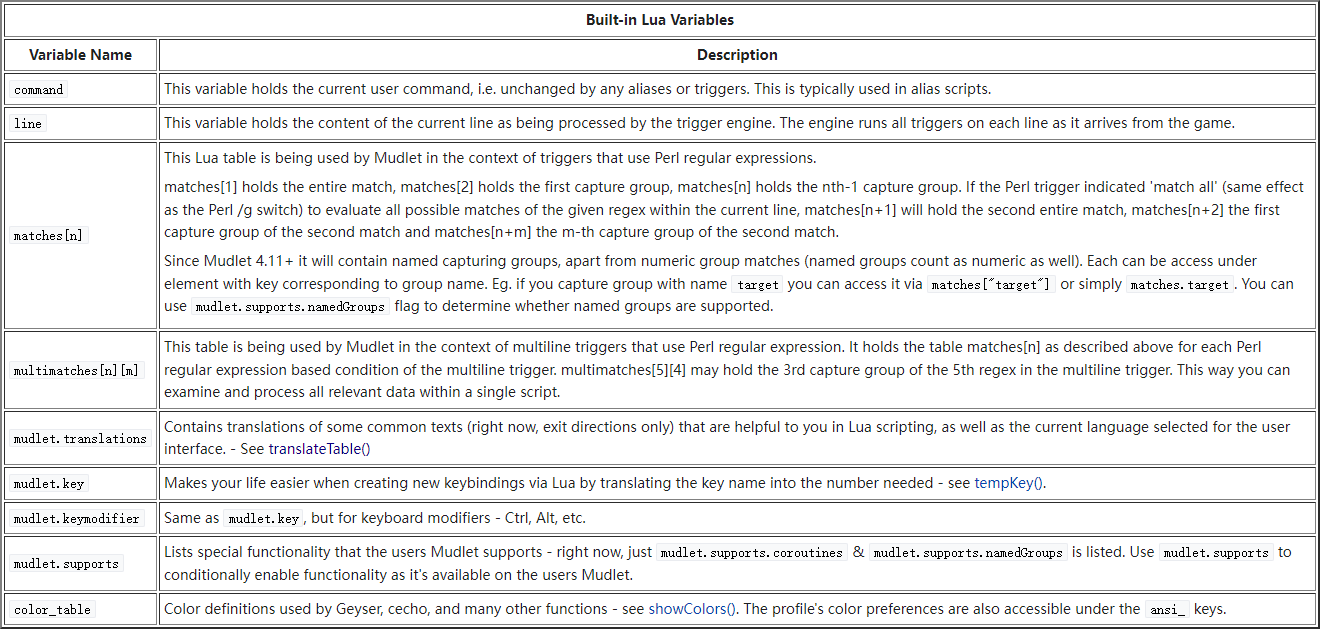
系统变量