使用generic_mapper
Mudlet客户端内置generic_mapper地图脚本,可以方便自动画地图,玩家不需要复杂的操作.
而且现在已支持中文地图,在游戏中输入map basics检查是否正常可用, 输入start mapping city,然后通过移动画地图.
提示:地图脚本一直在更新升级,为了保证使用的是最新版,可以在游戏中输入
map update更新generic_mapper,同时你自己写的地图相关功能一定一定不要写在generic_mapper下面,否则升级会丢
如果输入map update更新失败,请先输入以下指令切换到国内镜像:
lua map.configs.download_path = "https://gitee.com/mudlet/Mudlet/raw/development/src/mudlet-lua/lua/generic-mapper"针对炎黄MUD,因为提供GMCP精确定位,可以使用以下方式:
- 建一个脚本,名称为
setGMCPRoomInfo:
function setGMCPRoomInfo() -- MUST match the 'name' above
  display([[--setGMCPRoomInfo--]])
  map.prompt.room = gmcp.Room.Info.name
  map.prompt.exits = table.concat(gmcp.Room.Info.exits, " ")
  map.prompt.hash = gmcp.Room.Info.hash
  raiseEvent("onNewRoom",map.prompt.exits)
  if map.mapping and map.getRoomAreaName ~= gmcp.Room.Info.area then
    map.set_area(gmcp.Room.Info.area)
  end
end-
添加用户event handler:
gmcp.Room.Info -
然后输入
start mapping area开始画地图
对过河的处理, 在地图上右击切换到编辑模式,点击设置出口,增加特殊出口,到目的地,指令为yell boat,如图所示:

另外在自动寻路上,过河需要暂停快走行走,可以如下设置:

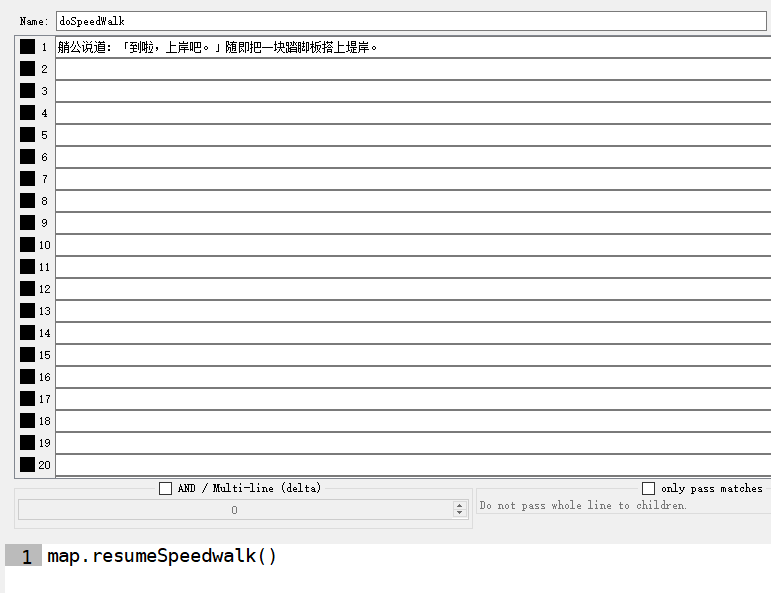
另外,推荐增加如下设置:

编辑模式有一些方便操作的功能,可以方便对自己画的地图做微调整,如移动位置,设置名称和坐标,删除错误房间等.

Generic_mapper 说明文档
Generic Map Script
This script allows for semi-automatic mapping using the included triggers.
While different games can have dramatically different ways of displaying
information, some effort has been put into giving the script a wide range of
potential patterns to look for, so that it can work with minimal effort in
many cases. The script locates the room name by searching up from the
detected exits line until a prompt is found or it runs out of text to
search, clearing saved text each time a prompt is detected or a movement
command is sent, with the room name being set to the last line of text
found. An accurate prompt pattern is necessary for this to work well, and
sometimes other text can end up being shown between the prompt and the room
name, or on the same line as the room name, which can be handled by
providing appropriate patterns telling the script to ignore that text. Below
is an overview of the included commands and important events that this
script uses to work. Additional information on each command or event is
available in individual help files.
Fundamental Commands
    These are commands used to get the mapper functional on a basic level

    map show - Displays or hides a map window
    map basics - Shows a quick-start guide with some basic information to
        help get the script working
    map help <optional command name> - Shows either this help file or the
        help file for the command given
    find prompt - Instructs the script to look for a prompt that matches
        a known pattern
    map prompt - Provides a specific pattern to the script that matches
        your prompt, uses Lua string-library patterns
    map ignore - Provides a specific pattern for the script to ignore,
        uses Lua string-library patterns
    map debug - Toggles on debug mode, in which extra messages are shown
        with the intent of assisting in troubleshooting getting the
        script setup
    map me - Locates the user on the map, if possible
    map path <room name> <; optional area name> - Finds a walking path to
        the named room, in the named area if specified
    map character <name> - Sets a given name as the current character for
        the purposes of the script, used for different prompt patterns
        and recall locations
    map recall - Sets the current room as the recall location of the
        current character
    map config <configuration> <optional value> - Sets or toggles the
        given configuration either turning it on or off, if no value is
        given, or sets it to the given value
    map window <configuration> <value> - Sets the given configuration for
        the map window to the given value
    map translate <english direction> <translated long direction>
        <translated short direction> - Sets the provided translations for
        the given english direction word.
Mapping Commands
    These are commands used in the process of actually creating a map

    start mapping <optional area name> - Starts adding content to the
        map, using either the area of the room the user is currently in,
        or the area name provided
    stop mapping - Stops adding content to the map
    set area <area name> - Moves the current room to the named area
    map mode <lazy, simple, normal or complex> - Sets the mapping mode, which
        defines how new rooms are added to the map.
    add door <direction> <optional door status> <optional one way> -
        Creates a door in the given direction, with the given status
        (default closed), in both directions, unless a one-direction door
        is specified
    add portal <entry command> - Creates a portal in the current room,
        using the given command for entry
    shift <direction> - Moves the current room on the map in the given
        direction
    merge rooms - Combines overlapping rooms that have the same name into
        a single room
    clear moves - Clears the list of movement commands maintained by the
        script
    set exit <direction> <roomID> - Creates a one-way exit in the given
        direction to the room with the specified roomID, can also be used
        with portals
    map areas - Shows a list of all area, with links to show a list of
        rooms in the area
    map rooms <area name> - Shows a list of rooms in the named area
Sharing and Backup Commands
    map save - Creates a backup of the map
    map load <remote address> - Loads a map backup, or a map file from a
        remote address
    map export <area name> - Creates a file from the named area that can
        be shared
    map import <area name> - Loads an area from a file
Mapping Events
    These events are used by triggers to direct the script's behavior

    onNewRoom - Signals that a room has been detected, optional exits
        argument
    onMoveFail - Signals that an attempted move failed
    onForcedMove - Signals that the character moved without a command
        being entered, required direction argument
    onRandomMove - Signals that the character moved in an unknown
        direction without a command being entered
    onVisionFail - Signals that the character moved but some or all of
        the room information was not able to be gathered
Key Variables
    These variables are used by the script to keep track of important
        information

    map.prompt.room - Can be set to specify the room name
    map.prompt.exits - Can be set to specify the room exits
    map.prompt.hash - Can be set to specify the room hash
        Notice: if you set this, mapper will only find room by
        getRoomIDbyHash(hash)
    map.character - Contains the current character name
    map.save.recall - Contains a table of recall roomIDs for all
        characters
    map.save.prompt_pattern - Contains a table of prompt patterns for all
        characters
    map.save.ignore_patterns - Contains a table of patterns of text the
        script ignores
    map.configs - Contains a number of different options that can be set
        to modify script behavior
    map.currentRoom - Contains the roomID of the room your character is
        in, according to the script
    map.currentName - Contains the name of the room your character is in,
        according to the script
    map.currentExits - Contains a table of the exits of the room your
        character is in, according to the script
    map.currentArea - Contains the areaID of the area your character is
        in, according to the script