用cocoscreator开发客户端入门还是很简单的,不过本人以前没有开发过,自己也是现学自做,所以教程仅供参考,期望能抛砖引玉,对有cocos开发经验的专业开发者来说,应该有更好的编码方式。
客户端版本:v2.4.6
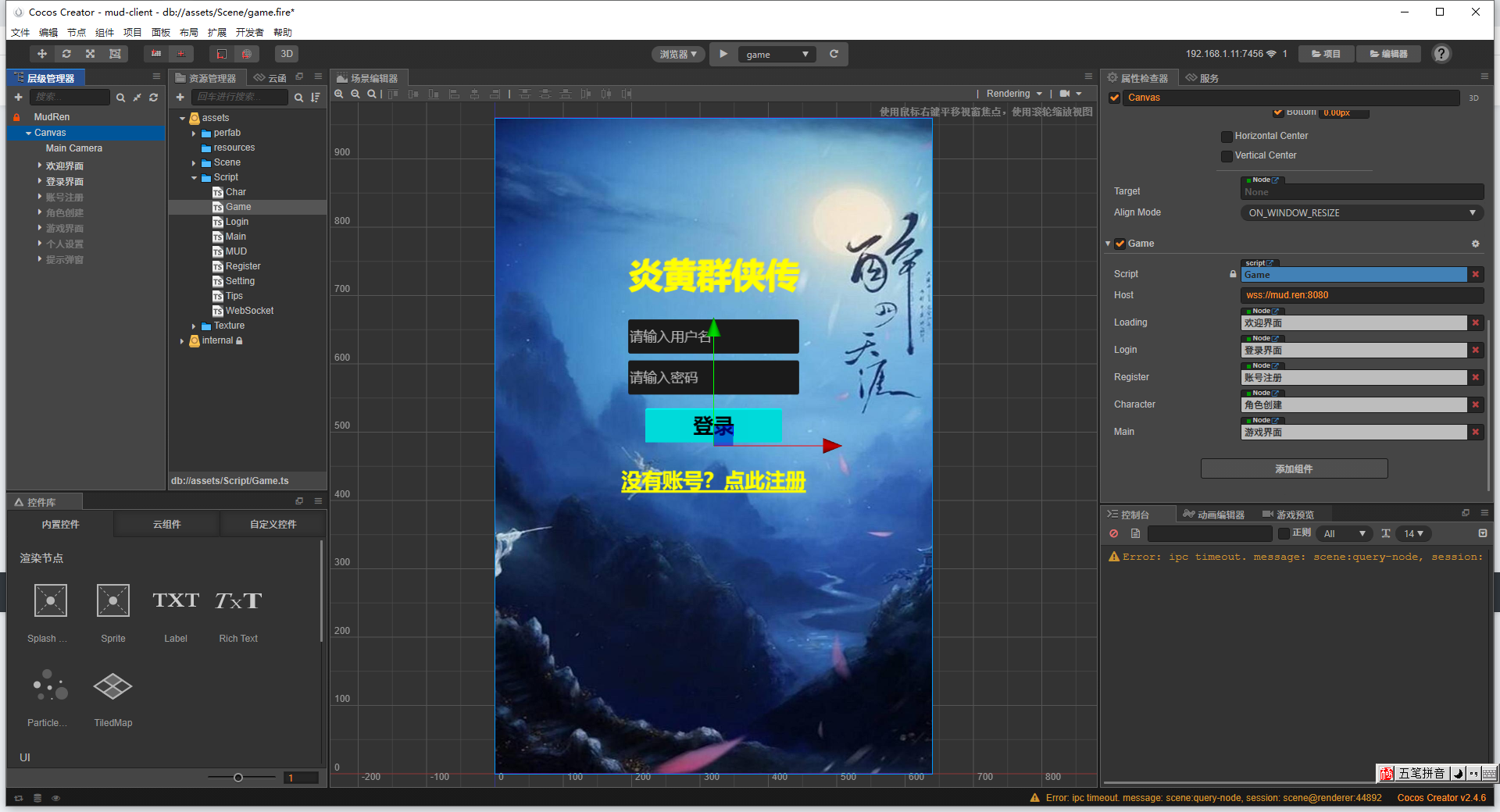
游戏分登录界面、账号注册界面、角色建立界面、游戏界面等,不同的界面功能我们建立不同的脚本来控制。另外我们建二个脚本MUD.ts和WebSocket.ts负责全局处理。
MUD.ts参考代码:
/*
 * @Author: 雪风@mud.ren
 * @Date: 2021-08-21 16:51:54
 * @LastEditTime: 2021-08-29 17:13:01
 * @LastEditors: 雪风
 * @Description: 全局对象
 *  https://bbs.mud.ren
 */
// Learn TypeScript:
//  - https://docs.cocos.com/creator/manual/en/scripting/typescript.html
// Learn Attribute:
//  - https://docs.cocos.com/creator/manual/en/scripting/reference/attributes.html
// Learn life-cycle callbacks:
//  - https://docs.cocos.com/creator/manual/en/scripting/life-cycle-callbacks.html

import Game from "./Game";
import Main from "./Main";
import Tips from "./Tips";
import MudSocket from "./WebSocket";

const { ccclass, property } = cc._decorator;

@ccclass
export default class MUD extends cc.Component {

    // @property(cc.Label)
    // label: cc.Label = null;

    // @property
    // text: string = 'hello';

    static websocket: MudSocket = null;
    static Game: Game = null;
    static Main: Main = null;
    static Tips: Tips = null;

    // LIFE-CYCLE CALLBACKS:

    onLoad() {
        // cc.log(this.node.getComponent('WebSocket'));
        MUD.websocket = this.node.getComponent('WebSocket');
        MUD.Game = cc.find('Canvas').getComponent('Game');
        MUD.Main = cc.find('Canvas/游戏界面').getComponent('Main');
        MUD.Tips = cc.find('Canvas/提示弹窗').getComponent('Tips');
    }

    start() {

    }
}
WebSocket.ts代码参考:
// Learn TypeScript:
//  - https://docs.cocos.com/creator/manual/en/scripting/typescript.html
// Learn Attribute:
//  - https://docs.cocos.com/creator/manual/en/scripting/reference/attributes.html
// Learn life-cycle callbacks:
//  - https://docs.cocos.com/creator/manual/en/scripting/life-cycle-callbacks.html

import MUD from "./MUD";

const { ccclass, property } = cc._decorator;

@ccclass
export default class MudSocket extends cc.Component {

    // @property(cc.Label)
    // label: cc.Label = null;

    // @property
    // text: string = 'hello';

    ws: WebSocket = null;

    // LIFE-CYCLE CALLBACKS:

    // onLoad () {}

    start() {
    }

    update(dt) {
    }

    // 连接游戏
    connect() {
        // 打开一个 web socket
        this.ws = new WebSocket(MUD.Game.host, "ascii");
        this.ws.binaryType = "arraybuffer";

        this.ws.onopen = (evt) => {
            cc.log("^^服务器连接成功!");
            // 进入登录界面
            MUD.Game.logon();
        };
        this.ws.onmessage = (event) => {
            let data = event.data;
            let stream = new Uint8Array(data);
            let msg: string;
            // 小程序不支持TextDecoder,使用自定义方法process_stream
            // let decoder = new TextDecoder('utf-8');
            // msg = decoder.decode(stream);
            msg = this.process_stream(stream);
            for (const data of msg.split("@@")) {
                if (data) {
                    cc.log(data);
                    // 过滤空数据
                    if (data.length < 2) return;
                    msg = JSON.parse(data);
                    this.msg_handdle(msg);
                }
            }
        };
        this.ws.onerror = (event) => {
            cc.log("^^服务器连接失败!");
            // game.reconnect();
            // MUD.Game.loading.getComponent('Loading').tip('服务器连接失败');
            MUD.Game.tip('服务器连接失败!', cc.Color.RED);
        };
        this.ws.onclose = (event) => {
            cc.log("^^服务器连接断开!");
            MUD.Game.reconnect();
        };
    }
    // 发送指令
    send(msg: string) {
        // cc.log("msg : " + msg);
        if (this.ws) {
            this.ws.send(msg + "\n");
        }
    }

    // 消息处理器
    msg_handdle(msg: any) {
        // cc.log(msg);
        let code = msg.code;
        let data = msg.data;
        switch (code) {
            // 载入主游戏界面
            case 201:
                MUD.Game.enterWorld();
                break;
            case 202:
                MUD.Game.tip(data.msg);
                break;
            case 204:
                MUD.Game.create();
                break;
            // 环境描述
            case 20010:
                // 清空对象列表
                MUD.Main.clearList();
                // 重置出口按钮
                MUD.Main.init_btn();
                // cc.log(msg.data.name);
                MUD.Main.room(data.name, data.msg);
                break;
            // 环境路径出口
            case 20011:
                for (const key in data.msg) {
                    let exits = data.msg[key];
                    // cc.log(exits);
                    let exit = exits.split(':')[0];
                    let name = exits.split(':')[1];
                    // cc.log(exit);
                    // cc.log(name);
                    MUD.Main.exits(exit, name);
                }
                break;
            // 环境对象
            case 2000:
            case 2001:
            case 2002:
            case 2003:
            case 2004:
                this.send('app_look');
                break;
            case 20014:
                // cc.log(data);
                if (data.user) {
                    for (const iterator of data.user) {
                        MUD.Main.addList(iterator[1], iterator[2]);
                    }
                }
                if (data.npc) {
                    for (const iterator of data.npc) {
                        MUD.Main.addList(iterator[1], iterator[2]);
                    }
                }
                if (data.item) {
                    for (const iterator of data.item) {
                        MUD.Main.addList(iterator[1], iterator[2]);
                    }
                }
                break;
            case 20013:
                break;
            case 20000:
                MUD.Main.addContent(data.msg, data.type);
                break;
            case 20001:
                MUD.Main.addContent(data.msg, 'nature');
                break;
            case 20020:
                MUD.Main.addChat(data.msg, data.type);
                break;
            default:
                break;
        }
    }

    // 自定义工具
    process_stream(stream) {
        let buffer, index, length, result, value;

        buffer = [];
        length = stream.length;

        for (index = 0; index < length; ++index) {
            value = stream[index];

            if (value > 0xBF) {
                result = this.parse_utf8(stream, index, value, buffer);

                if (result) {
                    index = result;
                    continue;
                }
                // IAC
                if (value === 255) {
                    console.log(value);
                    // todo GMCP
                }
            } else if (value < 0x1C) {
                switch (value) {
                    // BELL
                    case 7:
                    // LF
                    case 10:
                    // CR
                    case 13:
                    // ESC(\0x1b)
                    case 27:
                        // todo ANSI
                        break;
                }
            }

            buffer.push(value);
        }

        if (buffer.length) {
            return String.fromCharCode.apply(null, buffer);
        }
    }

    parse_utf8(stream, index, value, buffer) {
        let result;

        do {
            // 1110 0000    3字节
            if ((value >> 4) === 0x0E) {
                value = ((value & 0x0F) << 12)
                    | ((stream[++index] & 0x3F) << 6)
                    | (stream[++index] & 0x3F);
                // 1100 0000    2字节
            } else if ((value >> 5) === 0x06) {
                value = ((value & 0x1F) << 6)
                    | (stream[++index] & 0x3F);
                // 1111 0000    4字节
            } else if ((value >> 3) === 0x1E) {
                value = ((value & 0x07) << 18)
                    | ((stream[++index] & 0x3F) << 12)
                    | ((stream[++index] & 0x3F) << 6)
                    | (stream[++index] & 0x3F);
                // 1111 1000    5字节
            } else if ((value >> 2) === 0x3E) {
                value = ((value & 0x03) << 24)
                    | ((stream[++index] & 0x3F) << 18)
                    | ((stream[++index] & 0x3F) << 12)
                    | ((stream[++index] & 0x3F) << 6)
                    | (stream[++index] & 0x3F);
                // 1111 1100    6字节
            } else if ((value >> 1) === 0x7E) {
                value = ((value & 0x01) << 30)
                    | ((stream[++index] & 0x3F) << 24)
                    | ((stream[++index] & 0x3F) << 18)
                    | ((stream[++index] & 0x3F) << 12)
                    | ((stream[++index] & 0x3F) << 6)
                    | (stream[++index] & 0x3F);
            } else {
                // 1字节(ASCII字符)
                break;
            }

            buffer.push(value);
            result = index;
            value = stream[++index];
        } while (value > 0xBF);

        return result;
    }
}
MUD.ts和WebSocket.ts为全局脚本,提前挂载,其中WebSocket.ts中对收到的数据处理是使用的自定义方法,如果不开发小程序版,可以直接使用TextDecoder。
登录Login.ts:
/*
 * @Author: 雪风@mud.ren
 * @Date: 2021-08-14 21:20:59
 * @LastEditTime: 2021-08-24 09:55:40
 * @LastEditors: 雪风
 * @Description: 用户登录控制
 *  https://bbs.mud.ren
 */
// Learn TypeScript:
//  - https://docs.cocos.com/creator/manual/en/scripting/typescript.html
// Learn Attribute:
//  - https://docs.cocos.com/creator/manual/en/scripting/reference/attributes.html
// Learn life-cycle callbacks:
//  - https://docs.cocos.com/creator/manual/en/scripting/life-cycle-callbacks.html

import MUD from "./MUD";

const { ccclass, property } = cc._decorator;

@ccclass
export default class Login extends cc.Component {

    @property(cc.EditBox)
    id_node: cc.EditBox = null;

    @property(cc.EditBox)
    pass_node: cc.EditBox = null;

    @property(cc.Node)
    register: cc.Node = null;

    // @property
    // text: string = 'hello';

    // LIFE-CYCLE CALLBACKS:

    // onLoad() {}

    start() {
    }

    // update (dt) {}

    command(event: cc.Event, cmd: string) {
        // cc.log(cmd);
        if (cmd == "login") {
            let id = this.id_node.string;
            let pass = this.pass_node.string;
            if (!id || !pass) {
                MUD.Game.tip('用户名和密码不能为空!');
                return;
            }
            // cc.log(id);
            // cc.log(pass);
            if (MUD.websocket) {
                MUD.websocket.send(id + ' ' + pass);
            }
        }
        if (cmd == "register") {
            this.register.active = true;
        }
    }
}账号注册Register.ts:
/*
 * @Author: 雪风@mud.ren
 * @Date: 2021-08-12 01:04:11
 * @LastEditTime: 2021-08-23 21:33:11
 * @LastEditors: 雪风
 * @Description: 账号注册
 *  https://bbs.mud.ren
 */
// Learn TypeScript:
//  - https://docs.cocos.com/creator/manual/en/scripting/typescript.html
// Learn Attribute:
//  - https://docs.cocos.com/creator/manual/en/scripting/reference/attributes.html
// Learn life-cycle callbacks:
//  - https://docs.cocos.com/creator/manual/en/scripting/life-cycle-callbacks.html

import MUD from "./MUD";

const { ccclass, property } = cc._decorator;

@ccclass
export default class Register extends cc.Component {

    // @property(cc.Label)
    // label: cc.Label = null;

    // @property
    // text: string = 'hello';

    @property(cc.EditBox)
    id: cc.EditBox = null;

    @property(cc.EditBox)
    pass: cc.EditBox = null;

    // LIFE-CYCLE CALLBACKS:

    // onLoad() {}

    // start() {}

    // update (dt) {}

    // 游戏事件指令
    command(event: cc.Event, cmd: string) {
        // cc.log(cmd);
        if (cmd == "register") {
            let id = this.id.string;
            let pass = this.pass.string;
            if (!id || !pass) {
                MUD.Game.tip('用户名和密码不能为空!');
                return;
            }
            // cc.log(id);
            // cc.log(pass);
            if (MUD.websocket) {
                MUD.websocket.send('reg ' + id + ' ' + pass);
            }
        }
        if (cmd == "login") {
            this.node.active = false;
        }
    }
}角色创建Char.ts:
/*
 * @Author: 雪风@mud.ren
 * @Date: 2021-08-23 22:42:19
 * @LastEditTime: 2021-08-24 16:08:59
 * @LastEditors: 雪风
 * @Description: 角色注册控制
 *  https://bbs.mud.ren
 */
// Learn TypeScript:
//  - https://docs.cocos.com/creator/manual/en/scripting/typescript.html
// Learn Attribute:
//  - https://docs.cocos.com/creator/manual/en/scripting/reference/attributes.html
// Learn life-cycle callbacks:
//  - https://docs.cocos.com/creator/manual/en/scripting/life-cycle-callbacks.html

import MUD from "./MUD";

const { ccclass, property } = cc._decorator;

@ccclass
export default class NewClass extends cc.Component {

    @property(cc.EditBox)
    uname: cc.EditBox = null;
    @property(cc.ToggleContainer)
    gender: cc.Toggle = null;
    @property(cc.ToggleContainer)
    character: cc.Toggle = null;
    @property(cc.EditBox)
    str: cc.EditBox = null;
    @property(cc.EditBox)
    int: cc.EditBox = null;
    @property(cc.EditBox)
    con: cc.EditBox = null;
    @property(cc.EditBox)
    dex: cc.EditBox = null;

    _sex: string = '男性';
    _type: string = '光明磊落';
    // LIFE-CYCLE CALLBACKS:

    // onLoad () {}

    start() {

    }

    // update (dt) {}

    getSex(evt: cc.Event, str: string) {
        this._sex = str;
    }
    getChar(evt: cc.Event, type: string) {
        this._type = type;
    }
    register(evt: cc.Event, cmd: string) {
        // cc.log(cmd);
        let info = this.uname.string + '|' + this._sex + '|' + this._type + '|' + this.str.string + ' ' + this.int.string + ' ' + this.con.string + ' ' + this.dex.string + '|扬州人氏';
        // cc.log(info);
        if (cmd == 'yes') {
            if (!this.uname.string) {
                MUD.Game.tip('角色名必须为2~4个汉字');
                return;
            }
            if (MUD.websocket) {
                MUD.websocket.send(info);
            }
        }
        else {
            this.node.active = false;
        }
    }
}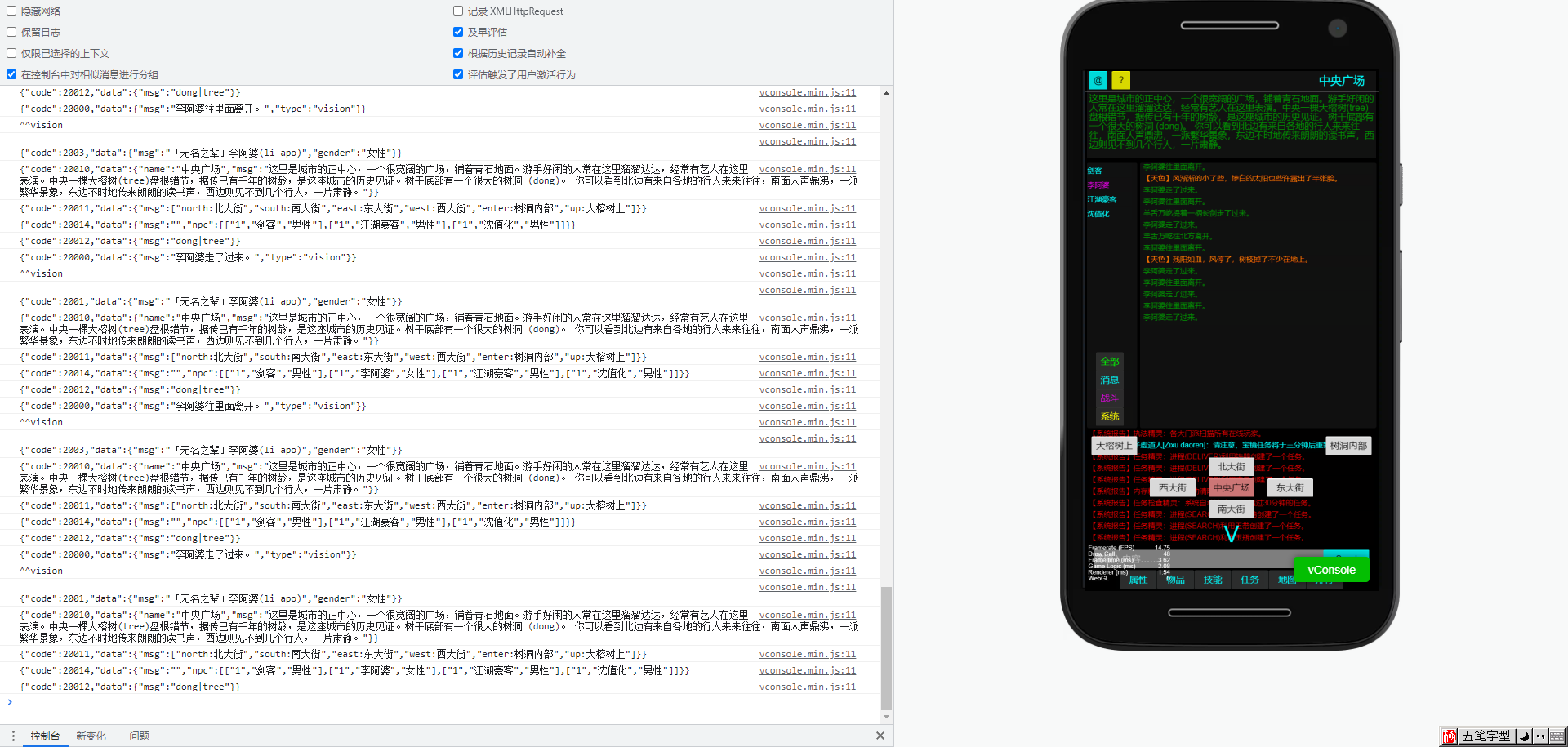
客户开发更多的界面布局和数据处理,因个人经验有限,不做具体演示。希望有更专业的大佬发教程指导~